

With WordPress 7.0, the Block Editor is aligned with the other editor contexts. Blocks are designed to render inside an iframe across all editor screens. The fallback mechanism that allowed non-iframe rendering under certain conditions up to and including WordPress 6.9 is planned to be removed.
Block API v3 has existed for several releases already. With WordPress 7.0, however, it effectively becomes the reference model for how blocks behave in the editor. Not because the API itself has fundamentally changed, but because it assumes a strictly isolated rendering environment. Implementations that rely on assumptions outside of that isolation no longer behave reliably.
In many existing projects, this change only becomes visible now. The Block Editor in the classic post editing screen was a long-standing exception. Styles, layouts, and scripts could interact with or be influenced by the admin DOM. In other editor contexts, this has not been possible for years. WordPress 7.0 completes that alignment by removing the last non-iframe rendering path in the Block Editor.
Why Existing Projects Are Affected Most
The issues that appear are not caused by new APIs. They stem from implicit assumptions. In many custom block implementations, the Block Editor was effectively treated as part of the admin DOM. Styles relied on editor wrappers, layouts depended on surrounding structures, and scripts were initialized globally.
These patterns only worked because the post editing screen did not have its own isolated render container. With the iframe in place, that shared DOM space no longer exists.
WordPress 7.0 does not introduce a new block architecture. It standardizes how the Block Editor renders.
How to tell whether a project is affected
Up to and including WordPress 6.9, the Block Editor had a technical fallback mechanism. As soon as at least one block was registered with apiVersion: 2, the Block Editor in the post editing context could render without an iframe.
This state was neither a feature nor an officially documented mode. It existed solely to avoid immediately breaking existing blocks. WordPress 6.9 did not change this behavior functionally, but introduced a warning. That warning appeared only in the browser console and only when SCRIPT_DEBUG was enabled.
With WordPress 7.0, this fallback path is removed, and the Block Editor is expected to render blocks inside an iframe across all editor screens, independent of block API version.
Block API v2 is not removed. It simply no longer has any influence on whether the editor renders in an isolated context.
If you are unsure whether a project is affected, you usually do not need WordPress 7.0 to find out. Blocks that already behave correctly in the Site Editor or Template Editor tend to be close to the target architecture. Those editors have been running in an isolated context for years.
Problems almost always appear in projects where custom blocks were only ever tested in the classic post editing screen and implicitly relied on admin-level structures. WordPress 7.0 does not introduce this difference. It simply makes it visible everywhere.
What Typically Breaks First
In practice, blocks that run into issues after the switch to iframe rendering rarely fail because of the Block API itself. Problems usually surface where blocks relied on behavior that was never guaranteed.
Typical indicators are:
- editor styles that target
.wp-admin,.editor-styles-wrapper, or similar admin-level wrappers - JavaScript that queries the global
documentinstead of working from the block’s root element - scripts or libraries initialized once globally instead of per block instance
- layout behavior that implicitly depended on the surrounding editor DOM
A useful rule of thumb: If a block already behaves correctly in the Site Editor or Template Editor, it is usually close to being compatible with the WordPress 7.0 rendering model.
If it only ever worked reliably in the classic post editing screen, it likely depended on the very fallback that is now gone.
CSS: Where the iframe Boundary Becomes Visible First
Many blocks contain CSS that was never truly block-scoped CSS:
.editor-styles-wrapper .my-block { … }
.wp-admin .my-block { … }
These selectors assume that the block and the editor live in the same DOM. Inside an iframe, that assumption no longer holds. The block only sees its own document tree.
From WordPress 7.0 onward, this becomes consistent:
CSS that is not loaded directly with the block does not technically belong to the block. Stable styling is limited to CSS that:
- targets the block root directly
- is registered via
styleoreditorStyle - does not depend on the admin DOM
Anything else only worked as a side effect of the missing iframe.
JavaScript: No Shared document Anymore
The iframe separates more than styles. It also separates the DOM context.
document.querySelectorAll('.my-block')
window.addEventListener('resize', …)
These patterns assume that the block and the editor share the same document. Inside an iframe, they do not. The block lives in its own document, with its own window.
From WordPress 7.0 onward, the only stable entry point is the block element itself. Initialization, event handling, and cleanup must be scoped to that element. Global DOM access inside the editor is no longer reliable, regardless of API version.
Third-Party Libraries in an iframe Context
Libraries that internally rely on window, document, or a global DOM structure are particularly problematic.
As long as the Block Editor was not consistently rendered inside an iframe, this often went unnoticed. With WordPress 7.0, that assumption becomes visible. Libraries that cannot be initialized in an element-scoped way tend to break first inside the Block Editor.
Images by advancedcustomfields.com
ACF Blocks and iframe Rendering
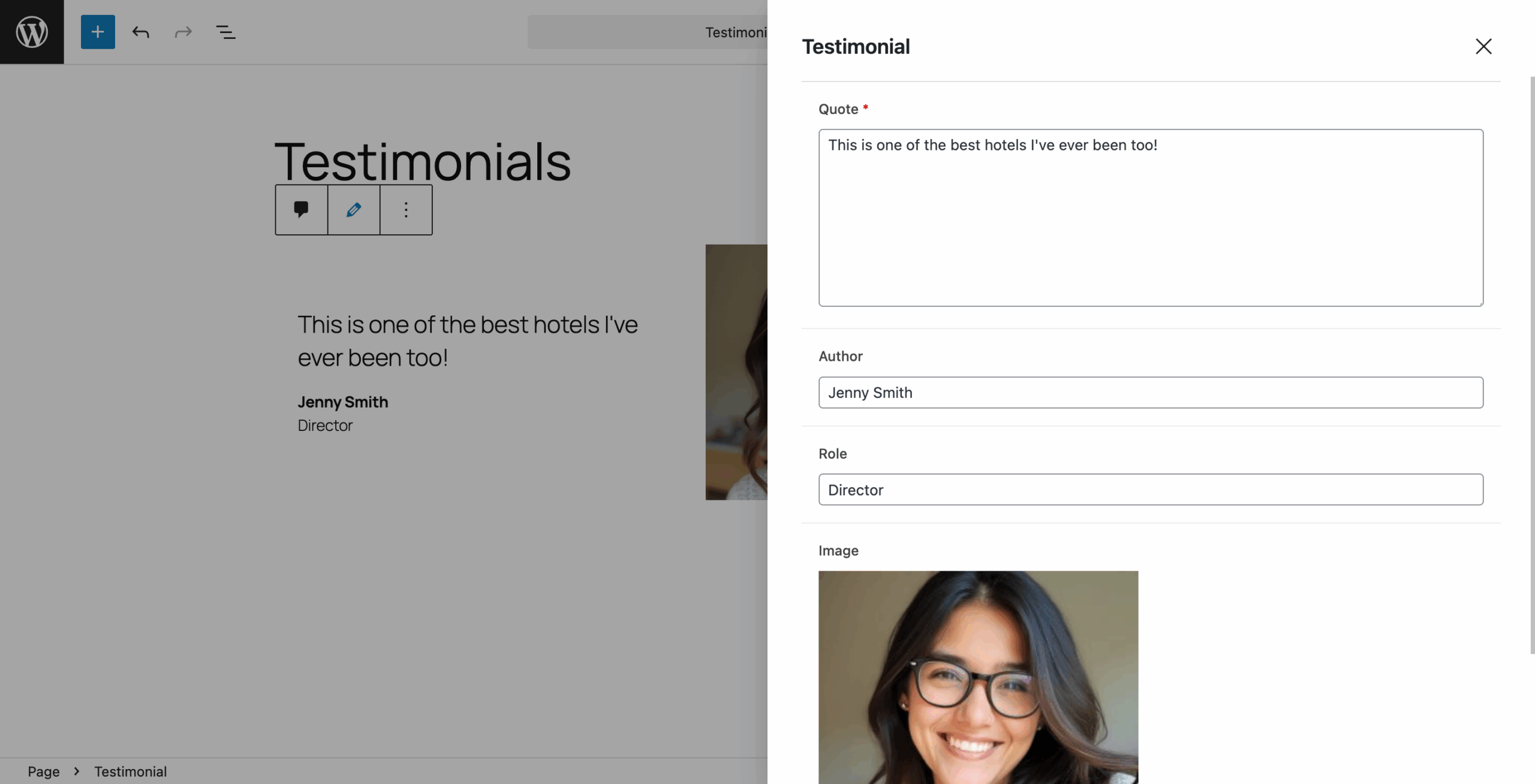
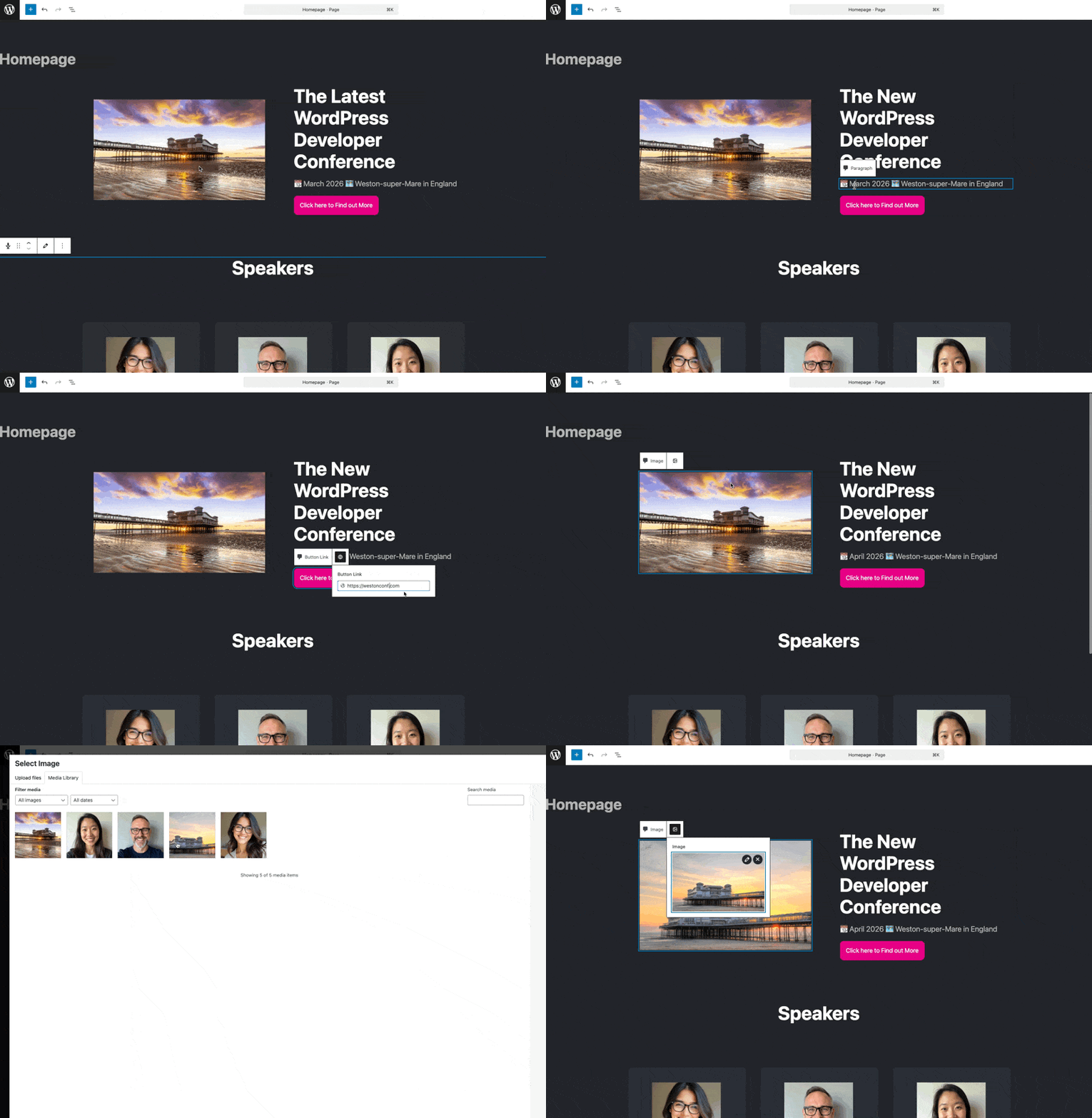
The evolution of ACF Blocks toward version 3 is a direct response to iframe rendering. The previous preview-based editing model was tightly coupled to the editor DOM and could not be maintained reliably in an isolated context.
Inline editing and overlay-based editors separate rendering and interaction cleanly. The block remains stable in the editor, while editing happens outside the block’s DOM.
The removal of the old preview editing mode is not a step backward. It is an adaptation to the Block Editor’s iframe model.
The Relevant Question Going Forward
WordPress 7.0 does not change the block architecture. It standardizes how the Block Editor renders. Up to and including WordPress 6.9, the post editing screen had a special case where rendering could happen without an iframe under certain conditions. That exception is fully removed.
From WordPress 7.0 onward, there is no shared DOM context between the Block Editor and the admin interface. Blocks must always assume that rendering, styles, and scripts run inside an isolated document.
This is not a new direction. It is the consistent conclusion of a transition that has been underway for years.