

WordPress 7.0 launches on Wednesday, May 20. The headline feature was supposed to be real-time collaboration. That got pulled three weeks before launch after architectural issues with how it interacted with post caches, and it’s been deferred to 7.1. What’s left is bigger for plugin developers anyway: a provider-agnostic AI Client baked into Core, a full JavaScript counterpart to the Abilities API, and a Connectors infrastructure for managing AI provider plugins. Plugin developers now build against a stable AI abstraction instead of hard-coding vendor SDKs. This is the biggest architectural addition to WordPress since Gutenberg shipped in 2018.
I’ve spent the last weeks running 7.0 RC against blocks and plugins I maintain through Kreo Pulse and UnleashWP. The AI stack is the priority before you build against 7.0. The rest is migration work, and one piece of it has a high chance of breaking blocks you’ve already shipped if you don’t audit block.json before Wednesday.
Here’s the pre-launch read.
The AI Client: the new substrate
The WP AI Client is the centerpiece of the 7.0 release. It sits on top of the [wordpress/php-ai-client]. SDK that Core now bundles as a dependency.
If you aren’t adding AI features in this release, you can skip ahead. If you are, or if you’re maintaining a plugin that already calls AI providers directly, read this carefully. Direct vendor integrations are what 7.0 lets you stop maintaining.
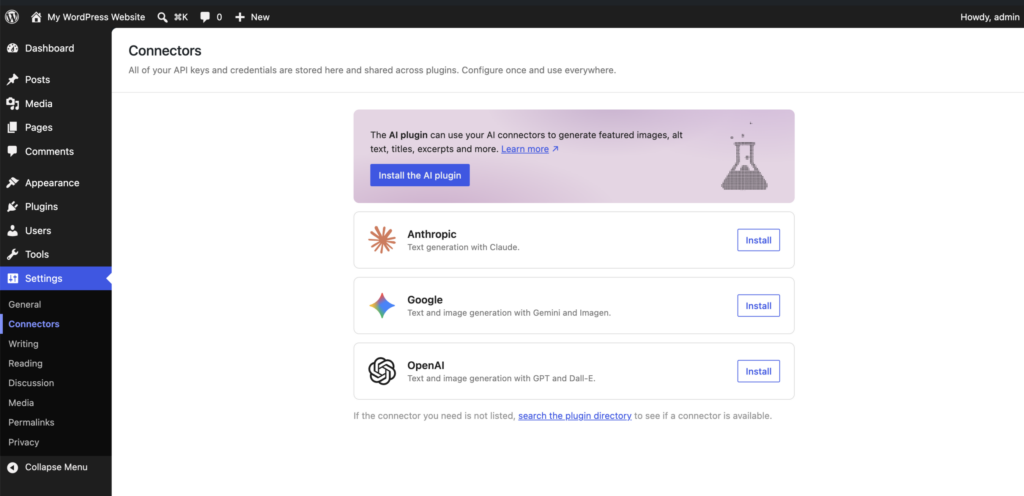
Your plugin describes what it wants. Core routes the request to whichever provider the site owner has configured under Settings > Connectors. You never touch API keys. Three official provider plugins ship alongside Core, one each for Anthropic, Google, and OpenAI. Custom providers register through the Connectors API.
Keeping the providers as separate plugins is deliberate. Provider APIs change too fast for Core’s release cadence. The abstraction lives in Core, the providers ship updates whenever they need to.
The basic pattern
$text = wp_ai_client_prompt( 'Summarize the benefits of object caching in WordPress.' )
    ->using_temperature( 0.7 )
    ->generate_text();

if ( is_wp_error( $text ) ) {
    return;
}

echo wp_kses_post( $text );
wp_ai_client_prompt() returns a WP_AI_Client_Prompt_Builder. Chain configuration on, then call a generation method. Errors come back as WP_Error rather than exceptions. The Core wrapper catches exceptions from the underlying SDK and converts them.
Detect before you render
Not every site has a provider configured. If you build UI around an AI feature that can’t run, your plugin breaks on those sites:
$builder = wp_ai_client_prompt( 'test' )
    ->using_temperature( 0.7 );

if ( $builder->is_supported_for_text_generation() ) {
    // Safe to render the feature UI.
}
These checks are deterministic and don’t make API calls. Available variants: is_supported_for_text_generation(), is_supported_for_image_generation(), is_supported_for_text_to_speech_conversion(), is_supported_for_speech_generation(), is_supported_for_video_generation(). Use them to hide UI, show a notice pointing to the Connectors screen, or skip enqueueing scripts when AI isn’t available.
Model preferences
You don’t know which models the site has access to. Express a preference and let Core fall back:
$result = wp_ai_client_prompt( 'Summarize the history of the printing press.' )
    ->using_temperature( 0.1 )
    ->using_model_preference(
        'claude-sonnet-4-6',
        'gemini-3.1-pro-preview',
        'gpt-5.4'
    )
    ->generate_text_result();
A preference, not a requirement. If none of your listed models are available, Core picks a compatible one. Your plugin needs to function either way.
The generate_*_result() variants return a GenerativeAiResult with metadata: token usage, provider, model. Useful for logging and audit trails. The object is serializable and returns cleanly from a REST callback:
function unleashwp_ai_summary_callback( WP_REST_Request $request ) {
    $result = wp_ai_client_prompt( $request->get_param( 'prompt' ) )
        ->generate_text_result();

    return rest_ensure_response( $result );
}
WP_Error objects work the same way in rest_ensure_response(), with appropriate HTTP codes attached.
Cache aggressively
The dev note doesn’t say it explicitly, so I will. Every AI call costs money and time. If you’re generating content that doesn’t need to be unique per-request, wrap the call:
function unleashwp_get_ai_summary( int $post_id ): string {
    $modified  = get_post_modified_time( 'U', false, $post_id );
    $cache_key = 'unleashwp_ai_summary_' . $post_id . '_' . $modified;
    $cached    = get_transient( $cache_key );

    if ( false !== $cached ) {
        return $cached;
    }

    $result = wp_ai_client_prompt( get_post_field( 'post_content', $post_id ) )
        ->using_system_instruction( 'Summarize the article in three sentences.' )
        ->generate_text();

    if ( is_wp_error( $result ) ) {
        return '';
    }

    set_transient( $cache_key, $result, WEEK_IN_SECONDS );
    return $result;
}
Keying the transient on get_post_modified_time() lets the cache invalidate naturally when the post is edited. Skipping the cache layer is the fastest way to surprise a client with a four-digit API bill.
Govern at the site level
For administrators who want hard limits on what AI calls can happen, the wp_ai_client_prevent_prompt filter blocks prompts before they execute:
add_filter(
    'wp_ai_client_prevent_prompt',
    function ( bool $prevent, WP_AI_Client_Prompt_Builder $builder ): bool {
        if ( ! current_user_can( 'edit_posts' ) ) {
            return true;
        }
        return $prevent;
    },
    10,
    2
);
When a prompt is prevented, no call is attempted, is_supported_*() returns false so plugins can hide their UI, and generate_*() returns a WP_Error. This is the hook for rate limiting, role-based blocking, time-of-day controls, or quota management. Wire it in on any agency site where you can’t predict which plugins will start making AI calls.
Don’t expose the JavaScript AI client in distributed plugins
There’s a JavaScript counterpart to the AI Client, available through the [wp-ai-client] package. It looks convenient. The dev note is explicit that it isn’t the right choice for plugins shipped through the directory.
The reason: the client-side API allows arbitrary prompt execution. To prevent untrusted users from sending any prompt to a configured provider and burning through someone else’s credits, it requires a high-privilege capability check. By default that means administrators only.
Use the pattern shown above instead: a specific REST endpoint per AI feature, with granular permission checks there, and prompt configuration kept on the server. The JS API is fine for admin-only tools you build for yourself or for a specific client. For a plugin in the directory, don’t.
Migrating from the standalone packages
If you’ve been bundling wordpress/php-ai-client via Composer, the simplest migration is to bump Requires at least to 7.0, drop the Composer dependency, and replace AI_Client::prompt() calls with wp_ai_client_prompt().
If you need to keep WP < 7.0 support, you need a conditional autoloader so Composer doesn’t load duplicate class definitions alongside Core’s bundled copy:
if (
    ! function_exists( 'wp_get_wp_version' )
    || version_compare( wp_get_wp_version(), '7.0', '<' )
) {
    require_once __DIR__ . '/vendor/autoload.php';
}
The function_exists() guard handles older versions where wp_get_wp_version() doesn’t yet exist. Composer’s autoloader is all-or-nothing, so the conditional wraps the full autoload. If that’s too coarse for your dependency graph, split the AI packages into a separate Composer setup.
For wordpress/wp-ai-client, the migration is simpler. It detects the WP version automatically and disables its own SDK on 7.0+ while keeping the REST endpoints and JavaScript API active. Load it unconditionally. The package is likely to be discontinued once those pieces land in Gutenberg or Core (tracked in #64872 and #64873).
One housekeeping detail. If your plugin’s AI features genuinely require a specific provider plugin to be present, declare that with the Requires Plugins header in your main plugin file. The dependency surfaces to administrators on install, which avoids “AI feature broken” support tickets from missing provider plugins.
The Abilities API: the underrated piece
The Abilities API itself isn’t new. It shipped in 6.9. What’s new in 7.0 is the full JavaScript counterpart and the tighter integration with the AI Client.
An ability is a named callback with a schema. You give it a name, a description, an input schema, an output schema, a permission callback, and a function that runs when something calls it. The “something” can be your own code, another plugin, an AI agent through the AI Client, or, coming soon, a browser extension implementing WebMCP.
That last part is what makes the Abilities API more than an AI feature. It’s the workflow primitive WordPress hasn’t had: a permission-checked, schema-validated way to expose plugin actions to anything that knows the abilities store.
The two packages
The client side ships as two packages:
@wordpress/abilitiesis the pure store: registration, querying, execution, no server dependencies. You can use it in non-WordPress JS projects.@wordpress/core-abilitiesis the WordPress integration. Loading it fetches all server-registered abilities (via/wp-abilities/v1/) into the client store. WordPress Core enqueues it on every admin page, so server abilities are available in the admin by default.
Most plugins want @wordpress/core-abilities. Enqueue it as a script module:
add_action( 'admin_enqueue_scripts', function () {
    wp_enqueue_script_module( '@wordpress/core-abilities' );
} );
If you only need client-side abilities scoped to one admin page, enqueue @wordpress/abilities instead and skip the REST round-trip.
Registering an ability
Categories are required and have to exist before abilities register. Server-side categories load automatically. Client-side ones you declare yourself:
const { registerAbilityCategory, registerAbility } = await import( '@wordpress/abilities' );

registerAbilityCategory( 'unleashwp-actions', {
    label: 'UnleashWP Actions',
    description: 'Workflow actions provided by UnleashWP plugins',
} );

registerAbility( {
    name: 'unleashwp/create-item',
    label: 'Create Item',
    description: 'Creates a new item with the given title and content',
    category: 'unleashwp-actions',
    input_schema: {
        type: 'object',
        properties: {
            title: { type: 'string', minLength: 1 },
            content: { type: 'string' },
            status: { type: 'string', enum: [ 'draft', 'publish' ] },
        },
        required: [ 'title' ],
    },
    output_schema: {
        type: 'object',
        properties: {
            id: { type: 'number' },
            title: { type: 'string' },
        },
        required: [ 'id' ],
    },
    permissionCallback: () => currentUserCan( 'edit_posts' ),
    callback: async ( { title, content, status = 'draft' } ) => {
        // Create the item.
        return { id: 123, title };
    },
} );
Input and output are validated against their JSON schemas when executeAbility() is called. Permission callbacks run first; a failure throws ability_permission_denied.
One caveat to flag before you build on this: the input schema validation currently doesn’t support a sanitize_callback property, which the AI plugin already relies on. This was raised on the dev note (WordPress/ai#346), with a fix proposed in Gutenberg PR #77029. Track it if you plan to register abilities that consume AI-generated input.
Executing and reacting
import { executeAbility } from '@wordpress/abilities';

try {
    const result = await executeAbility( 'unleashwp/create-item', {
        title: 'New Item',
        content: 'Item content',
        status: 'draft',
    } );
} catch ( error ) {
    switch ( error.code ) {
        case 'ability_permission_denied':
        case 'ability_invalid_input':
        case 'ability_invalid_output':
            // Handle the specific failure mode.
            break;
    }
}
For reactive UIs, the abilities store integrates with @wordpress/data:
import { useSelect } from '@wordpress/data';
import { store as abilitiesStore } from '@wordpress/abilities';

function AbilitiesList() {
    const abilities = useSelect(
        ( select ) => select( abilitiesStore ).getAbilities(),
        []
    );
    // ...
}
Annotations decide HTTP semantics
When a server-side ability is executed through the client, the underlying REST call uses an HTTP method derived from the ability’s annotations:
readonly: trueproducesGETdestructive: trueplusidempotent: trueproducesDELETE- Everything else produces
POST
registerAbility( {
    name: 'unleashwp/get-stats',
    // ...
    meta: {
        annotations: {
            readonly: true,
        },
    },
    callback: async () => ( { views: 100 } ),
} );
Annotate your abilities correctly. A misannotated destructive ability gets the wrong HTTP semantics, which has implications for caching, retries, and middleware that respects HTTP method conventions.
Why this matters even without AI
The Abilities API is a clean way to expose plugin functionality to other code, with typed contracts, permissions, and a single execution path. Even without an AI agent in sight, declaring your plugin’s actions as abilities means they become callable from any other plugin, from custom admin interfaces you build later, and from any future workflow runner that targets the abilities store.
For agency work, this is the part I’m most quietly excited about. The Abilities API is what custom admin scripts in WordPress should have looked like for a decade.
The block.json audit before Wednesday
The migration item that breaks plugins. Unsynced patterns and template parts now default to contentOnly editing mode. The mechanism shipped in 6.7. What’s new is the default state. As of Wednesday, every pattern your block ends up in runs in contentOnly mode unless somebody flips the switch off, which most sites won’t.
Inside contentOnly, users edit text and media. The deeper block structure stays hidden, style controls don’t open. What counts as editable content lives in your block.json, on each attribute’s role property:
{
  "attributes": {
    "url": {
      "type": "string",
      "role": "content"
    },
    "label": {
      "type": "string",
      "role": "content"
    }
  }
}
Blocks without any "role": "content" attribute are hidden from List View and unselectable inside a contentOnly container. Shape of the failure: client opens a pattern on a 7.0 site, tries to edit a label, can’t find the block in List View, opens a ticket Thursday morning. You know that conversation.
For blocks without an obvious content attribute, the Pattern Editing dev note describes a "contentRole": true flag at the supports level. The note’s own code example shows "contentOnly": true instead, which looks like an editorial inconsistency rather than the intended API. Verify against the current Core source before relying on either spelling. The dev note text is clear: prefer "role": "content" on a specific attribute where possible.
If you build parent-child block pairs, the rule changes slightly. When both parent and child declare a content role, contentOnly mode allows insertion of new child blocks. Core examples: List with List Item, Gallery with Image, Buttons with Button. If you ship a Testimonials block with Testimonial items or a Pricing Table with Tiers, declare content roles on both sides. Otherwise users can’t add new items inside a pattern.
For site owners who want to opt out of the new default outright, there’s an escape valve. Via PHP:
add_filter( 'block_editor_settings_all', function( $settings ) {
    $settings['disableContentOnlyForUnsyncedPatterns'] = true;
    return $settings;
} );
Or via JavaScript on the client:
wp.data.dispatch( 'core/block-editor' ).updateSettings( {
    disableContentOnlyForUnsyncedPatterns: true,
} );
A per-site valve, not a fix for plugin authors. Template parts and synced patterns stay in contentOnly mode regardless. The right move is to update your blocks.
While you’re in block.json, add "listView": true to supports for any block that contains inner blocks. New in 7.0, this adds a List View tab to the block inspector with a dedicated UI for rearranging and adding children. Useful inside patterns too.
An hour per plugin if your block.json files were tidy to start with. Longer if not. Run it today.
PHP-only block registration: the quiet shift
The implementation (Trac #64639) lets you register a fully functional block in PHP only: no edit.js, no Webpack pipeline, no block.json file.
function unleashwp_register_php_blocks() {
    register_block_type(
        'unleashwp/example',
        array(
            'title'           => 'Example Block',
            'attributes'      => array(
                'title'   => array(
                    'type'    => 'string',
                    'default' => 'Hello World',
                ),
                'count'   => array(
                    'type'    => 'integer',
                    'default' => 5,
                ),
                'enabled' => array(
                    'type'    => 'boolean',
                    'default' => true,
                ),
                'size'    => array(
                    'type'    => 'string',
                    'enum'    => array( 'small', 'medium', 'large' ),
                    'default' => 'medium',
                ),
            ),
            'render_callback' => function ( $attributes, $content, $block ) {
                return sprintf(
                    '<div class="unleashwp-example unleashwp-example--%s">%s: %d</div>',
                    esc_attr( $attributes['size'] ),
                    esc_html( $attributes['title'] ),
                    (int) $attributes['count']
                );
            },
            'supports'        => array(
                'autoRegister' => true,
            ),
        )
    );
}
add_action( 'init', 'unleashwp_register_php_blocks' );
That’s the whole block. It appears in the inserter, gets an automatically-generated Inspector Controls sidebar from the declared attributes (text input for title, number for count, toggle for enabled, select for size with the enum values), and renders via the server-side callback. The render_callback signature is the standard three-parameter form. Even if you only use $attributes, declaring all three keeps signatures consistent across your codebase.
The sweet spot, for me, is dynamic content blocks that used to live as either shortcodes or ACF field groups: bound query results, dynamic listings, footer widgets that need to read site state, anywhere the user’s job is to pick a few values and let the server render the output. For an agency shipping client-specific blocks, this changes the calculus on what gets registered as a block in the first place.
What it’s explicitly not for: blocks meant to be highly interactive. The auto-generated inspector controls handle scalar types like string, integer, boolean, and enum. They don’t handle image uploads, media pickers, rich text editing inside the block, or custom React controls. If your block needs any of that, JavaScript registration is still the path.
A few open questions from the early Make/Core comments that aren’t fully resolved: inner blocks aren’t supported through PHP-only registration yet, and media picker attributes don’t get auto-generated controls. If either describes a block you want to build, stick with JS for now.
This isn’t a Wednesday-deadline item. PHP-only registration is forward-compatible with everything that already works. It’s a tool to keep in mind for your next custom block, not a migration step.
Font Library lands in classic themes
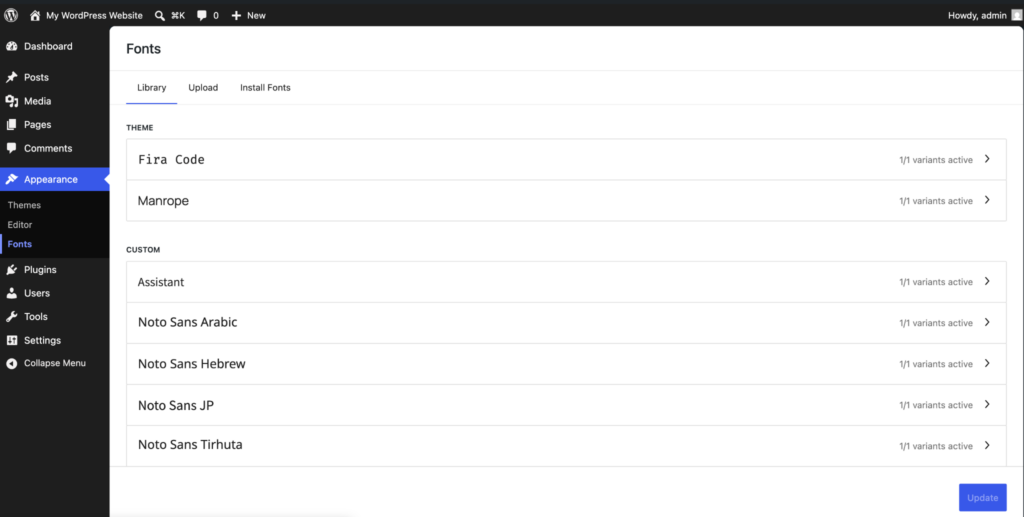
The Font Library shipped in 6.5 for block themes. In 7.0 it works for classic and hybrid themes too. Site owners upload custom fonts and install Google Fonts from Appearance > Fonts, then apply them per block from the typography sidebar. The interface mirrors the Media Library, available as both a modal during editing and a dedicated admin section.
For agency teams maintaining classic themes, this closes a real friction point. Custom font management used to mean either a plugin dependency (Custom Fonts, Easy Google Fonts) or manual @font-face declarations in functions.php. Both go away. Your users get the same font workflow that block theme users have had for a year.
The bigger shift underneath: Global Styles now work on classic themes. Gutenberg PR #73971 wires the Styles UI to non-block themes by parsing theme defaults from CSS. If you maintain a classic theme, audit what users can now override through Global Styles. The cascade between your theme’s stylesheets and user-applied Global Styles is non-obvious. You may need to update stylesheet specificity or ship a theme.json partial to keep the design intent intact.
If your plugin’s value proposition is font management for non-FSE sites, the ground shifted. Core handles upload, library, and per-block application. What’s left as plugin territory: subsetting, performance optimization, font pairing, advanced typography controls. Reposition before launch day.
The smaller things shipping Wednesday
The post editor runs in an iframe whenever every block in the post uses Block API v3 or higher. If any block is on apiVersion: 2, the iframe drops back for backwards compatibility. Your v2 blocks force every post they appear in out of the iframed experience. The v3 migration mostly comes down to your edit function’s wrapper element receiving the props from useBlockProps() directly, rather than relying on the editor adding them externally. If you’re already on v3, you’re done.
Minimum PHP is 7.4 now. PHP 7.2 and 7.3 are gone. Update Requires PHP before tagging.
The Interactivity API picks up a watch() function in @wordpress/interactivity that subscribes to any signal accessed inside a callback and re-runs the callback when those signals change, with a data-wp-watch directive on the DOM side. Useful if you’ve been wiring subscriptions manually. Administrator and Editor roles are no longer in the new-user role selector under Settings > General, with Site Health flagging sites where one was previously selected and the default_role_dropdown_excluded_roles filter available if you need to add either back.
Your Wednesday morning, decoded
If you tag a 7.0-compatible release today or tomorrow, here’s what should be in it.
Audit block.json for every block you ship. Set "role": "content" on every editable attribute, add "listView": true to any container block’s supports, and bump apiVersion from 2 to 3 wherever you’re behind. Update Requires PHP to 7.4 and Tested up to to 7.0.
If you bundle the wordpress/php-ai-client or wordpress/wp-ai-client Composer packages, follow the migration path in the AI Client dev note. If you’re adding AI features in this release, register your own REST endpoints rather than relying on the JavaScript AI client, and declare Requires Plugins for any provider plugin you depend on.
If your plugin exposes actions that other code might want to call (settings updates, content creation, that kind of thing), consider registering them as abilities. Not a Wednesday item, but put it on the list for your next release.
The full Field Guide links every individual dev note. Four are essential reading before you ship a 7.0-compatible plugin: the AI Client note, the Pattern Editing note, the Client-Side Abilities note, and the PHP-only block registration note.
May 20 is Wednesday. Make sure your plugin is ready before then.
Talking about 7.0 at WCEU
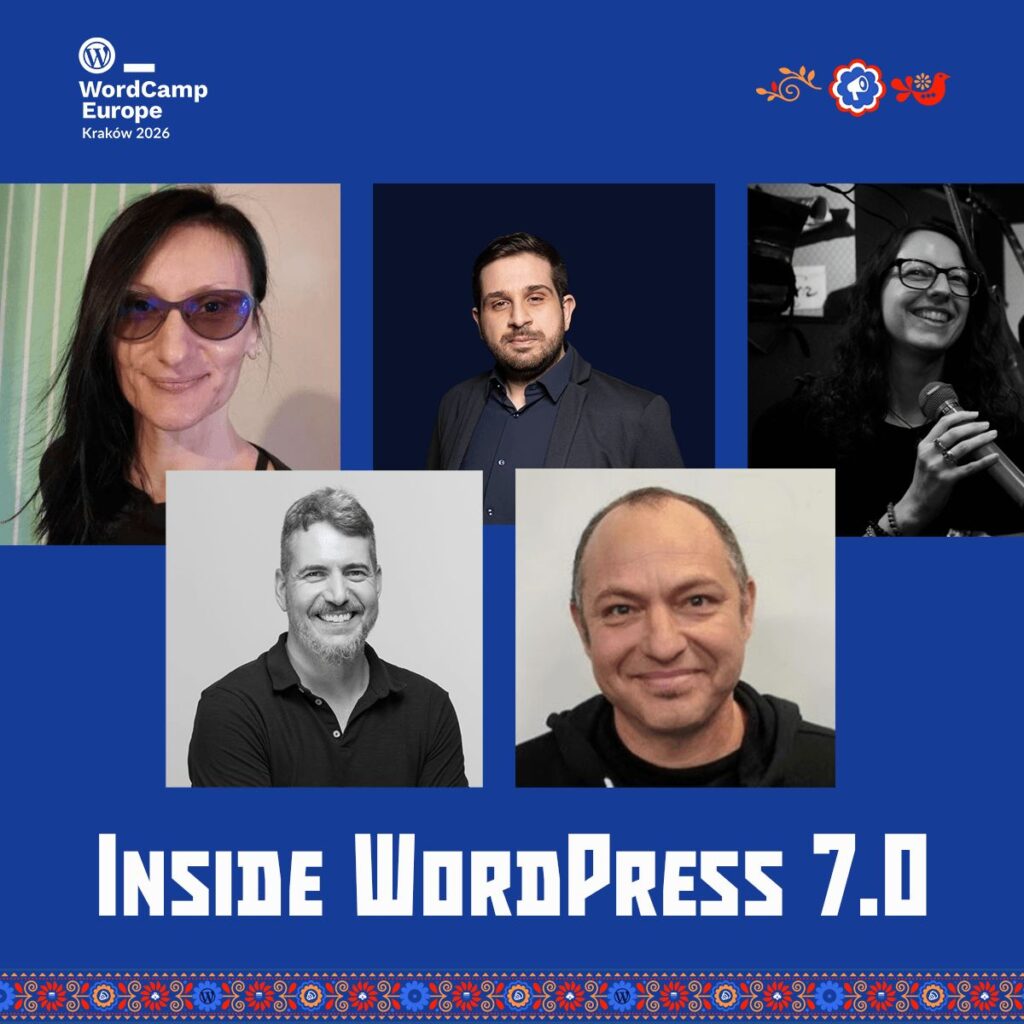
I’ll be on the “Inside WordPress 7.0” panel at WordCamp Europe 2026 in Kraków, June 4-6. Adam Silverstein, Sarah Norris, and Juan Manuel Garrido are on the panel with me, with Milana Cap moderating. We’ll cover what shipped in 7.0, what got pulled and why, and what’s coming in 7.1. The session is recorded and goes up on WordPress.tv after the event.
Sources: WordPress Core Blog