



I’ve seen it all in 15+ years as a developer. CI pipelines that deploy like clockwork, then suddenly share an SFTP password over Slack. Releases that run silky smooth, until a forgotten token on staging sends emails to real customers. Or the best one, a .env that someone accidentally pushed with plain text access to the production database.
Everything worked — and then it blew up. Not because of code. Not because of deployment. But because the third layer was missing: environment management and secret handling. The part no one talks about, until it’s too late.
Three environments — one structure
You don’t need a huge setup. But you do need clarity. Most developers distinguish at most between local and live and miss everything in between.
A realistic setup needs three stages:
| Environment | Purpose | Access | Particulars |
local | Development | Only you | Debug on |
staging | Preview, tests | Team & client | Real content, logging on |
production | Live system | Public | Anything that could interfere: off |
And here’s the point:
These environments must not live in your head. They must be anchored in the project, via configs, via WP_ENVIRONMENT_TYPE, via .env.
A real-world case
I was on a client project where a developer pushed a feature branch to staging. Everything was tested, the CI was green, the code was clean.
But the .env value MAIL_DRIVER=smtp was active. He assumed the system was using MailHog. He sent 2,000 emails to real recipients. A “test newsletter” with placeholder copy. The client lost three customers.
The fault? Not the code. Not the build. The fault was a missing environment flag and a setup without guardrails.
WP_ENVIRONMENT_TYPE – the underrated signal
Since WordPress 5.5, there’s an official environment function:
wp_get_environment_type();
It returns one of four values:
localdevelopmentstagingproduction
That may sound like a gimmick, but it’s gold — if you use it consistently.
Example:
if ( wp_get_environment_type() !== 'production' ) {
	add_filter( 'wp_mail', 'uwp_intercept_mails_to_nowhere' );
}

function uwp_intercept_mails_to_nowhere( $args ) {
	$args['to'] = '[email protected]';
	return $args;
}
Or:
WP_DEBUG is bootstrap configuration and belongs in wp-config.php.
define('WP_DEBUG', WP_ENVIRONMENT_TYPE === 'local');
Where does the value come from?
You can set it via a .env file, a server variable, or in wp-config.php.
define('WP_ENVIRONMENT_TYPE', getenv('WP_ENVIRONMENT_TYPE') ?: 'production');
Best practices for environment configuration:
Not all values listed here are WordPress core constants — some live on application or infrastructure level. The principle stays the same.
| What | Local | Staging | Production |
WP_ENVIRONMENT_TYPE | local | staging | production |
WP_DEBUG | true | true | false |
SAVEQUERIES | true | false | false |
MAIL_DRIVER | log | null | smtp |
SCRIPT_DEBUG | true | false | false |
DISABLE_WP_CRON | true | true | true |
APP_SECRET etc. | .env.local | Secret | Secret |
Without clean separation, you’ll introduce bugs by default — because you think you’re working locally, but your code is talking to live.
The biggest mistake: pushing .env to Git
Yes, today, .env files with API keys, passwords, tokens, and secrets still land on GitHub every day.
Usually with a commit like:add env for staging (temp!)
And three commits later, someone forgets to delete it.
How to do it right:
1. Create a .env.example with placeholders
DB_HOST=localhost
DB_USER=root
DB_PASSWORD=secret
APP_SECRET=changeme
2. Put your .env in .gitignore
.env
.env.local
.env.staging
.env.prod
!.env.example
3. Use .env.local, .env.staging, .env.prod. Per environment, but always stored locally or injected by CI.
4. Load with a Dotenv loader
$dotenv = Dotenv\Dotenv::createImmutable(__DIR__);
$dotenv->load();
5. Never hardcode plain text keys in code!
You don’t need another secrets tool. You need discipline. If you store secrets in Git, you don’t need CI, you need a kick in the build.
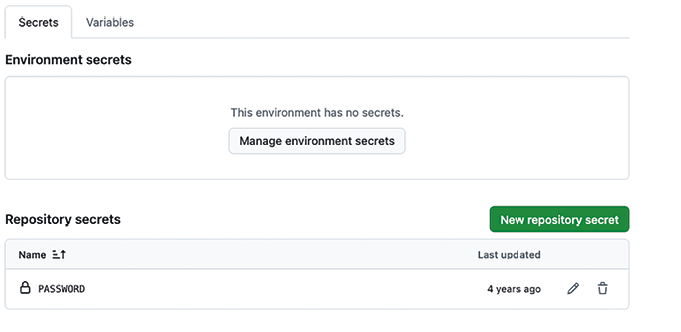
GitHub Secrets — use them properly, or don’t bother
I’ve seen projects where the production API key sat in plain text inside the workflow file. Just like that. Because “it’s only a private repo anyway,” or “the client doesn’t have access to GitHub,” or “we’ll secure it later.”
It was never secured. Eventually someone forked the project. The Action ran. And suddenly emails were sent to real users, with dummy content from the test run. I didn’t have to pay for the damage, but I rebuilt the deployment system afterward. From scratch.
Why does this happen?
Because many think, “I’m using GitHub Secrets, so it’s fine.” But if you don’t handle them properly, they’re just a fancier comment. You don’t need an extra tool. You need discipline, and the awareness that every secret is a responsibility. And if you don’t separate entries cleanly into local, staging, and production, then sooner or later, it will blow up.
How I do it in my projects
I never create secrets “by feel.” I name them clearly, I separate them by environment, and I document what they do. Not a novel, just clarity.
- name: Check SSH Key
  run: |
    if [ -z "$SSH_KEY" ]; then
      echo 'Missing SSH Key'; exit 1;
    fi
Example:
DEPLOY_KEY_STAGINGDEPLOY_KEY_PRODMAILGUN_TOKENAPP_SECRETSLACK_WEBHOOK_STAGING
No abbreviations, no guessing games, no surprises three months later.
And then use them — correctly.
env:
  SSH_KEY: ${{ secrets.DEPLOY_KEY_STAGING }}
If the key is missing, the workflow fails immediately. I’d rather have a failed build than a botched deploy in the middle of the night.
What not to do:
- Put secrets as comments into YAML.
- Use dummy values and “swap them later.”
- Use one key for everything (“it works everywhere”).
- Tell no one what each secret actually does.
I once audited a project with twelve secrets. Eight were unused. Two were outdated. One had a typo. And nobody knew what the last one was for. That’s not just unprofessional, it’s dangerous.
name: Production

on:
  push:
    branches: [ main ]

jobs:
  deploy:
    runs-on: ubuntu-latest
    environment:
      name: production
      url: https://live.example.com
GitHub Environments — not a toy
Want to deploy safely? Use Environments with approvals. No push goes to live directly. That happens only after manual confirmation. And the right secrets are exposed only in the right environment.
A key left uncontrolled in the system is worse than no key at all — because it makes you believe everything is safe, until someone proves it isn’t.

Included in the book
The book includes all chapters plus a:
- Toolkit with ready-to-use scripts
- Checklists for real projects