

What Novamira is
WordPress 7.0 finishes what 6.9 started with the Abilities API. A plugin can register a named callback with input and output schemas and a permission check. Once registered, the ability is callable through one uniform interface, regardless of whether the caller is server-side PHP, the block editor, or an external AI agent.
That contract isn’t an AI integration by itself. You also need a transport (MCP), authentication that doesn’t hand over your admin credentials, and a useful set of abilities worth calling.
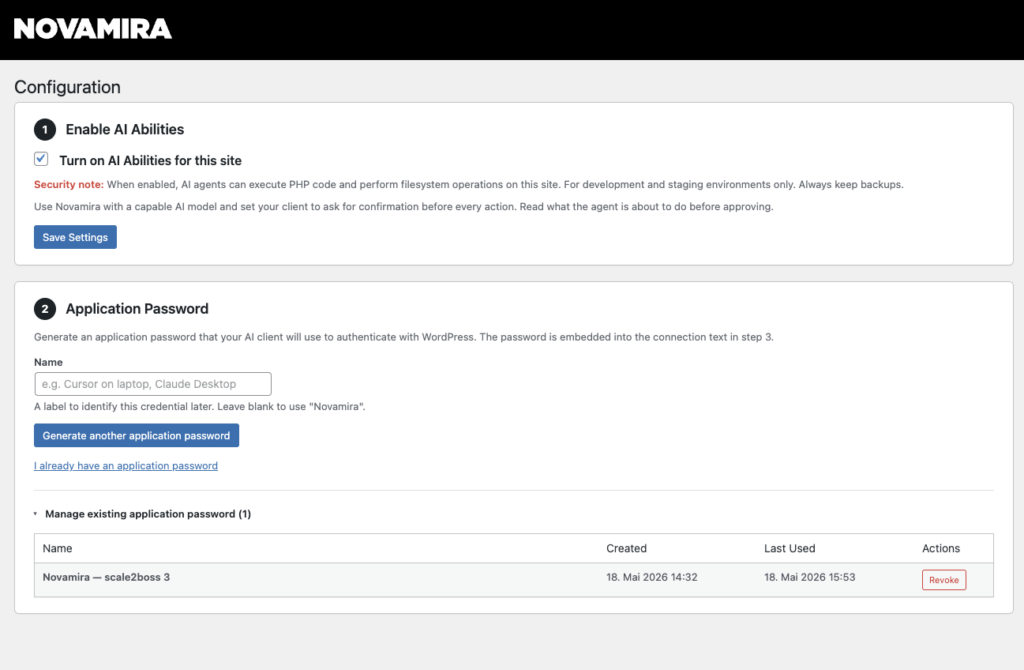
Novamira ships all three. The free plugin includes eight abilities: one for executing PHP and seven for filesystem work. Pro adds eight more for persistent memory, bundled skills, and post CRUD. The MCP bridge runs through @automattic/mcp-wordpress-remote, and the admin UI lists fifteen MCP-speaking clients with ready-made configuration snippets.
I tested Novamira 1.1.2 (free) and Novamira Pro 1.0.0.
Why MCP and not the WordPress AI Client API
WordPress 7.0 also ships the AI Client API (php-ai-client), and the two are easy to confuse. The direction of the call is what separates them.
The AI Client API gives WordPress a way to call AI models from server-side PHP. A plugin uses it to power features such as content suggestions in the editor or AI-generated alt text. WordPress sits on the calling end of the connection, the AI model on the receiving end.
Novamira sets up the inverse connection. An external AI agent (Claude Code, Cursor, Claude Desktop) calls into WordPress through the MCP bridge, and WordPress responds. The model runs in the developer’s IDE or terminal, not inside the WordPress install. Both can coexist on the same site: the AI Client API for runtime features in your plugin, Novamira for the agent that’s helping you build the plugin in the first place.
Setup
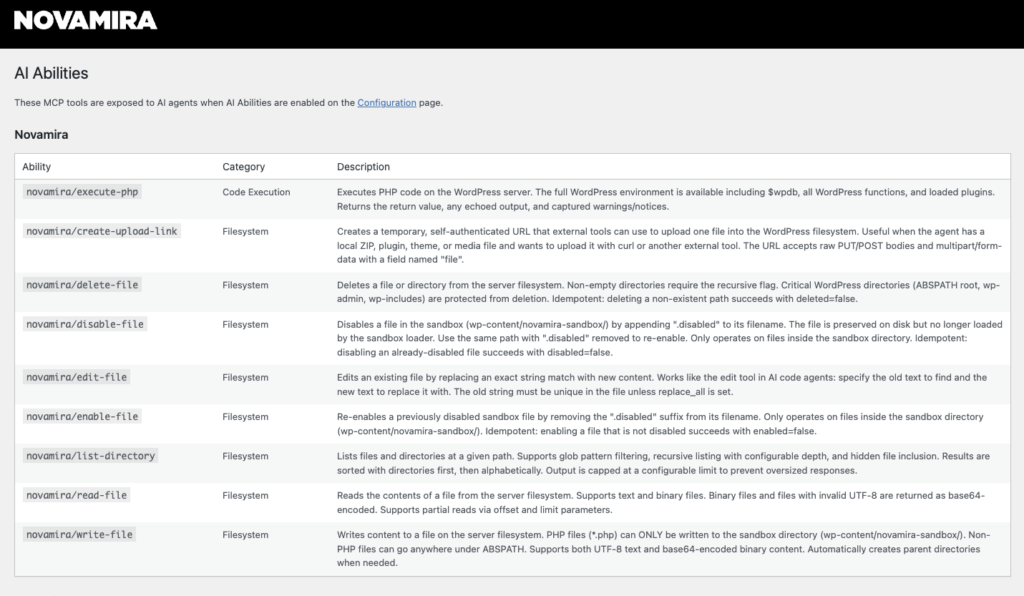
Two numbered blocks on the Configuration screen. The first creates an Application Password (WordPress displays it only at creation). The second presents the client config under one of fifteen tabs: Claude Code, Claude Desktop, Codex, Antigravity, Cursor, VS Code, GitHub Copilot, Windsurf, Cline, Gemini CLI, Roo Code, Amazon Q, Zed, Kilo Code, OpenCode.
For Claude Code:
claude mcp add 'novamira-unleash-wp-com' \
  --env WP_API_URL='https://example.com/wp-json/mcp/mcp-adapter-default-server' \
  --env WP_API_USERNAME='your-username' \
  --env WP_API_PASSWORD='YOUR-APP-PASSWORD' \
  -- npx -y @automattic/mcp-wordpress-remote@latest
The ability inventory
Free tier:
| Ability | What it does |
|---|---|
novamira/execute-php | Runs PHP on the server with the full WordPress environment loaded |
novamira/read-file | Reads text and binary files, with offset and limit for partial reads |
novamira/write-file | Writes files. PHP only inside the sandbox, non-PHP anywhere under ABSPATH |
novamira/edit-file | String-replace edits, same pattern as Claude Code’s edit tool |
novamira/delete-file | Deletes paths, with protections on ABSPATH, wp-admin, wp-includes |
novamira/disable-file | Soft-disables sandbox files by appending .disabled |
novamira/enable-file | Re-enables disabled sandbox files |
novamira/list-directory | Lists with glob patterns and configurable depth |
Pro tier:
| Ability | What it does |
|---|---|
novamira/memory-list | Returns the concise memory index |
novamira/memory-get | Returns the full body of a single memory |
novamira/memory-save | Creates or updates a memory |
novamira/memory-delete | Permanently deletes a memory |
novamira/skill-get | Loads the full body of a bundled skill |
novamira/create-post | Creates a post of any registered post type |
novamira/update-post | Partial post updates by ID |
novamira/delete-post | Trash by default, force flag for permanent delete |
That’s sixteen abilities split across three concerns: filesystem operations for the codebase, post CRUD for content, and memory for state that persists between sessions. If Elementor or Bricks are active, Pro conditionally loads around 21 additional abilities per builder.
The memory layer
Memories are typed records stored in the WordPress database with four categories: User, Feedback, Project, Reference. That’s the same taxonomy Claude Code uses for its own auto-memory system. The agent calls memory-list at the start of every session, pulls relevant bodies with memory-get, writes new memories with memory-save when it learns something durable, and deletes wrong ones with memory-delete when corrected.
This is the single feature that makes Novamira Pro feel like a product rather than a REST wrapper around the WordPress API. Storing memory server-side rather than in the client (Claude Code and Cursor both have their own local memory mechanisms) means the knowledge follows the site, not the developer. Two people working on the same install share the same agent memory, and switching from Claude Code to Cursor doesn’t lose it. Both properties matter when the memory is about the site rather than about the workflow.
The Memory & Instructions screen also lets you add custom instructions that get prepended to the MCP server instructions every agent reads on connect. Project conventions, house rules, anything you want every session to start with.
Sandbox and execute-php
novamira/write-file will write a .php file only inside wp-content/novamira-sandbox/. Anywhere else under ABSPATH is allowed for non-PHP files. An agent cannot install a backdoor into wp-content/plugins/, wp-content/mu-plugins/, or anywhere WordPress autoloads PHP from. The disable-file and enable-file abilities work specifically on this sandbox, so a file the agent wrote can be suspended and reviewed before being re-enabled.
execute-php is the ability that gives the agent meaningful reach. It runs whatever PHP you pass, with $wpdb, all WordPress functions, and loaded plugins available. In principle it could replicate most of what the other abilities offer; the curated abilities package those common patterns with better safety. It also does not honor the sandbox: filesystem writes are restricted, runtime is not. The Configuration page is direct about this and flags in red that the plugin is for development and staging environments only.
Engineering quality
The codebase is modern PHP 8 with strict_types=1 throughout. It bundles Automattic’s wordpress/mcp-adapter rather than shipping its own MCP server.
The detail that signals Dynamic.ooo has shipped production WordPress code before is the domain-lock. The plugin records the host it was activated on, and on every request it compares the current host. If they don’t match (a site clone, a restored backup, a database moved to a new domain), every ability stays dormant until a human re-confirms in the admin. That kind of defensive measure tends to be written by developers who have seen what happens when credentials remain active in cloned WordPress installs.
This isn’t a 1.0.0 from a team learning WordPress. Dynamic.ooo has been shipping Elementor and Bricks add-ons since 2018, and the codebase reflects that experience.
Shipped versus advertised
The marketing page advertises Pro specializations for eight ecosystems (Elementor, Bricks, ACF, JetEngine, Meta Box, ACPT, Pods, ASE). The 1.0.0 codebase ships two: Elementor and Bricks. The other six have not shipped, though Dynamic.ooo’s existing field-framework product line suggests they will. For ACF today, the MCP server instructions already tell the agent to use field groups and get_field() or update_field() via execute-php. That provides intelligent ACF handling through generic code execution rather than dedicated abilities.
For a buying decision, count only what has shipped, and discount the rest by your confidence in the vendor’s roadmap.
Pricing
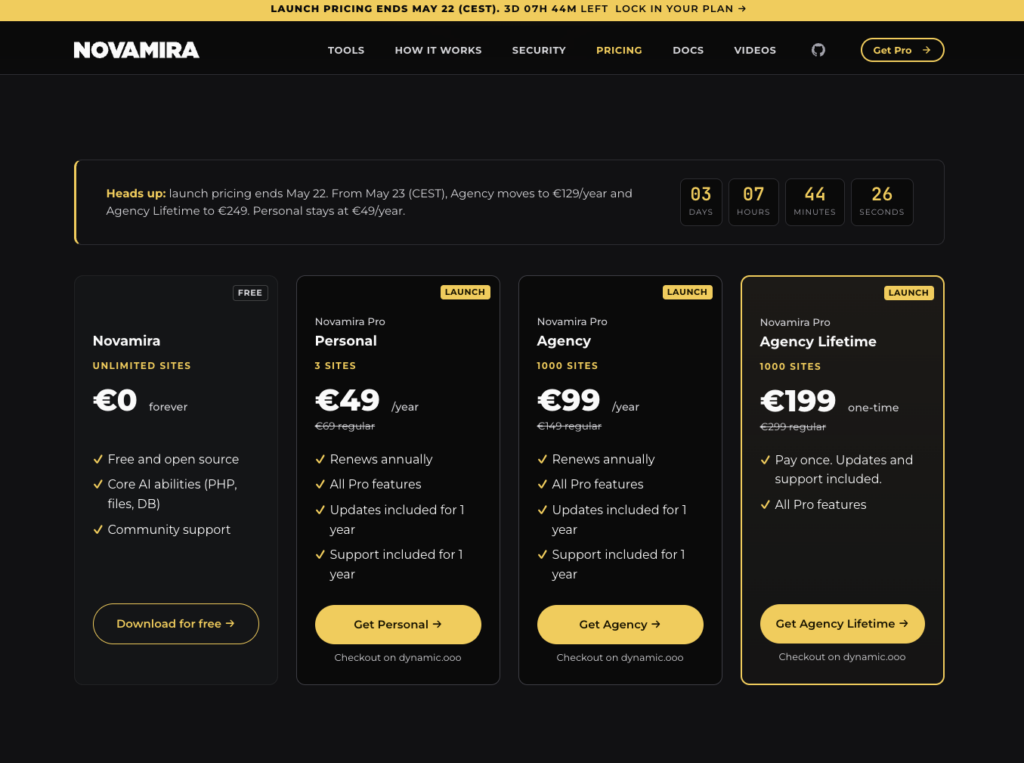
| Plan | Launch | Regular | Sites | Renewal |
|---|---|---|---|---|
| Personal | €49/yr | €69/yr | 3 | annual |
| Agency | €99/yr | €149/yr | 1,000 | annual |
| Agency Lifetime | €199 once | €299 once | 1,000 | one-time |
Personal at €49 a year sits below the threshold where a developer tool typically needs internal justification. Agency at €99 a year for 1,000 sites is unusually generous; the more common price point at this tier is closer to €99 for 100 sites.
Where I’d push back
Novamira works well for local dev and staging environments. On live sites I’d stay cautious for now, since every ability runs through manage_options.
Who this is for
Three audiences fit well in 1.0.0: agencies running staging sites for client builds (where Agency at €99/yr for 1,000 sites is priced for exactly that use case), page-builder shops on Elementor or Bricks (where Pro’s specializations deliver the clearest value today), and plugin or theme developers iterating against a real WordPress install (the free tier already covers this case).
If you work in ACF, JetEngine, Meta Box, ACPT, Pods, or ASE, the dedicated specializations remain on the roadmap. The MCP server instructions already make the agent ACF-aware via execute-php, but structured abilities will be measurably better. At €49 a year, Personal is inexpensive enough to buy in anticipation of the features you’ll actually want.
Where Novamira doesn’t fit: production sites with multiple admin users, especially client production. The combination of an all-or-nothing permission toggle, execute-php, and persistent memory written by an agent isn’t a stack you want shared with users who didn’t opt in.
Novamira Pro turns WordPress 7.0’s Abilities API into a working AI integration with sixteen well-chosen abilities, a meaningful sandbox, and the memory layer as the genuine differentiator. At €49 a year, Personal sits well below the threshold where a working WordPress developer’s tool budget needs review.
I’ve been running Pro on the UnleashWP development environment for a week, and the Pro layer paid for itself the first time the agent recalled a design system across a session boundary without me re-explaining it.
I’d recommend Novamira Pro to any developer or agency working on staging or personal WordPress sites. I would not run it on a multi-user production environment without strict access controls.